
AI Ad Creative for E-commerce: A Practical 2026 Guide
Quick answer
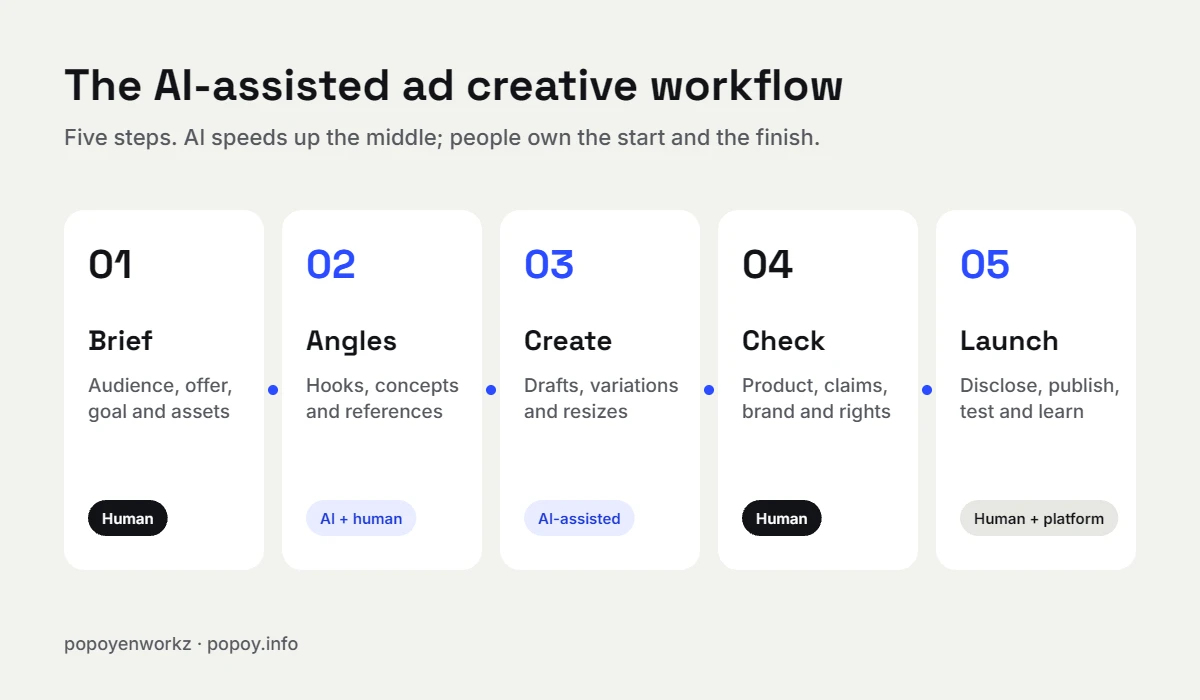
AI is now a practical tool for e-commerce ad creative, but it works best in the middle of the process, not at the start or the finish. Use it to explore concepts, draft hooks, clean up images, resize for placements, and produce more variations to test. Keep people in charge of the brief, the final choice, product and claim accuracy, brand consistency, and disclosure. Never use AI to invent customers, reviews, or testimonials.
Key takeaways
- AI saves the most time on exploration, resizing, cleanup, and variations, which are the parts of ad production that used to eat whole days.
- The brief, the offer, and the final pick are still human decisions. That is where most ad performance comes from.
- Check every AI-assisted ad for product accuracy, spelling, claims, and brand fit before it goes live.
- Fake AI testimonials and invented reviewers are banned under the U.S. FTC rule on reviews and testimonials. AI-edited UGC from real creators is a different thing.
- Ad platforms now label AI-made or AI-edited ads, and the EU AI Act adds disclosure duties for realistic synthetic content. Plan for disclosure instead of hiding it.
- Purely prompt-generated images are not protected by U.S. copyright. Human design work on top of them can be.
I have designed websites, static ads, UGC, and product films for more than 17 years. Over the last few years, AI has changed how quickly I can get from a blank canvas to a set of ads worth testing. It has not changed what makes an ad work: a clear offer, a real customer insight, and a design that earns three seconds of attention.
This guide is for e-commerce brand owners and marketers who want to use AI for ad creative without wasting budget or getting into trouble with platforms and regulators. It covers where AI helps, where it fails, a workflow you can copy, the rules that matter in 2026, and a checklist to use before every launch.
Why AI matters for ad creative right now
AI is no longer an experiment for most companies. McKinsey’s State of AI in 2025 survey found that almost all respondents say their organizations use AI, but most are still in the piloting stage rather than scaling it. Marketing and sales is one of the functions where respondents most often report revenue increases from AI.
For ad creative, that matters because paid social rewards volume and testing. Meta, TikTok, and Google all learn faster when they have more creative to work with. The brands that win are not the ones with the most AI tools. They are the ones that use AI to feed a disciplined testing process with better ideas, faster.
Where AI genuinely helps e-commerce ad creative
1. Exploring concepts before you commit
Image generators let you see three or four visual directions in an afternoon instead of a week. A rough concept for a skincare ad, a product-in-context scene, or a bold typographic layout gives everyone something concrete to react to. You decide the direction faster, and the final design starts from a better place.
2. Drafting hooks, headlines, and angles
Text tools are good at producing options. Ask for 20 hooks for a specific customer pain point and you will get a few worth testing and many you would never run. The value is in the volume of starting points, not the finished line. The final copy still needs to sound like your brand and speak to a real customer.
3. Cleaning up and extending product images
Background removal, extending a photo to fit a vertical placement, removing small distractions, and relighting a flat product shot are tasks that used to take real retouching time. AI tools inside Photoshop and similar apps now handle many of them in seconds, as long as someone checks that the product itself was not changed.
4. Resizing for every placement
One static ad often needs to exist as a square, a 4:5 feed version, a 9:16 story, and several display sizes. Automated resizing gets you most of the way there. A designer then fixes the crops, text sizes, and safe areas so nothing important gets cut off.
5. Making more variations to test
The biggest practical win is variation. When it is cheap to produce five backgrounds, three headlines, and two offers, you can run proper tests instead of guessing. More variations only help if you test one meaningful change at a time and give each version enough spend to learn something.
6. Speeding up UGC editing
For UGC-style video, AI helps with transcripts, captions, rough cuts, cleaning up audio, and finding the strongest three seconds for a hook. The creator, the product, and the experience still have to be real.
Where AI still falls short
- Product accuracy. Generated images can change the shape of a bottle, the color of a cap, or the text on a label. For e-commerce, an ad that shows a product that does not exist is a returns problem waiting to happen.
- Text inside images. Headlines, prices, and disclaimers rendered by image models are often misspelled or distorted. Set real type in a design tool instead.
- Brand consistency. AI does not remember your brand guidelines from one image to the next. Keeping colors, type, and tone consistent across a campaign still takes deliberate design.
- Sameness. When everyone prompts the same tools with similar words, the results start to look alike. Distinctive ads still come from a specific insight about your customer.
- Strategy. AI does not know your margins, your best customers, or why people buy from you. That context decides which ad is worth making.
- Rights and rules. Each tool has its own commercial-use terms, and each platform has its own rules on AI content. Someone has to own that check.
A practical AI ad creative workflow
This is the process I use for static ads and UGC-style edits. It works for a solo brand owner or a small team.
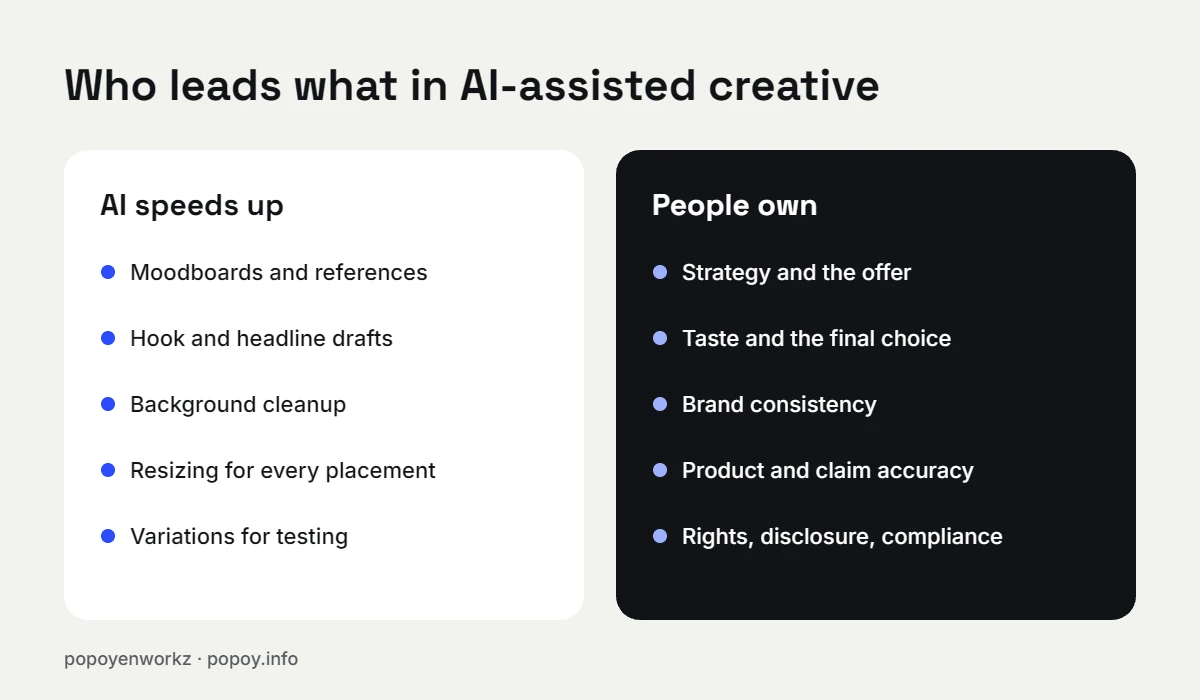
- Brief (human). Write down the audience, the single problem the product solves, the offer, the proof you can show, the placement, and the goal of the ad. A one-page brief beats any prompt.
- Angles (AI plus human). Use AI to generate hooks, angles, and visual references from the brief. Pick the three or four strongest. Discard anything that makes claims you cannot back up.
- Create (AI-assisted). Build the ads in a real design tool. Use AI for backgrounds, cleanup, extensions, and variations. Set all type, prices, and logos yourself.
- Check (human). Compare the product in the ad with the real product. Proofread every word. Confirm claims, offers, and prices. Check brand colors and type. Confirm you have the rights to every asset.
- Launch and learn (human plus platform). Disclose AI use where the platform or law requires it, launch a structured test, and keep notes on which angles win so the next round starts smarter.
A simple brief template you can reuse
| Field | What to write |
|---|---|
| Customer | Who is this for, in one sentence? |
| Problem | What are they frustrated with right now? |
| Promise | What changes after they use the product? |
| Proof | Reviews, results, demos, or guarantees you can actually show |
| Offer | Price, bundle, discount, or free shipping |
| Placement | Feed, story, reels, display, or marketplace |
| Must include | Logo, product shot, legal lines, brand colors |
| Must avoid | Claims you cannot prove, competitor names, off-brand styles |
AI and UGC: the line you should not cross
UGC works because people trust other customers. That trust is exactly why regulators care. The U.S. Federal Trade Commission’s rule on consumer reviews and testimonials, in effect since October 21, 2024, prohibits fake reviews and testimonials, including ones attributed to people who do not exist or who never used the product, and it explicitly covers AI-generated reviews.
In practice, that means:
- Using AI to edit, caption, or tighten a video from a real creator who used your product is normal production work.
- Using an AI avatar or voice to present your product can be acceptable when it is clearly presented as a brand ad and not as a real customer’s experience. Check platform rules and disclose it.
- Using AI to fake a customer, a review, a before-and-after, or a testimonial is not acceptable, no matter how realistic it looks.
Disclosure and platform labels in 2026
Ad platforms are moving from asking advertisers to disclose AI use toward detecting and labeling it themselves. Meta says it applies “AI info” labels to ad images created or significantly edited with its generative AI features or with third-party AI tools, and in early 2025 it announced that it would detect third-party AI edits through industry-standard signals. Meta also notes that minor changes such as resizing or color correction may not get a label.
If you sell into Europe, the EU AI Act’s Article 50 transparency rules have applied since August 2, 2026. Among other duties, they require deployers to disclose realistic AI-generated or manipulated content such as deepfakes, and they require providers of generative AI systems to mark synthetic content in a machine-readable way.
My advice is simple: treat disclosure as part of production, not as a risk to avoid. Keep a record of which tools touched each asset. An honest label rarely hurts a good ad. Getting caught hiding AI use can hurt a brand.
Who owns an AI-generated ad?
In the United States, the Copyright Office’s January 2025 report on copyrightability concluded that prompts alone do not give enough human control to make someone the author of an AI output. Human contributions, such as your own artwork used as an input, or creative selection, arrangement, and modification of AI material, can still be protected.
For brands, this is a good reason to keep real design work in the process. An ad built around your own photography, layout, and typography is far easier to protect than an image produced from a single prompt. This is general information, not legal advice. Talk to a lawyer about your specific situation.
Pre-launch checklist for AI-assisted ads
- The product looks exactly like the real one: shape, color, label, and size.
- Every word is spelled correctly, and all type was set in a design tool.
- Prices, offers, and dates match what the store will actually show.
- Every claim can be supported with proof.
- Brand colors, fonts, and logo usage follow your guidelines.
- No real person’s likeness or voice is used without permission.
- No fake customers, reviews, or testimonials appear anywhere.
- The tool’s terms allow commercial use of the output.
- AI use is disclosed where the platform or law requires it.
- The test plan is written down: what you are testing, the budget, and how long it runs.
Frequently asked questions
Can I use AI-generated images in Facebook and Instagram ads?
Yes. Meta allows AI-generated and AI-edited ad creative, and it may add an “AI info” label to ads made or significantly edited with AI tools. Ads about social issues, elections, or politics have stricter disclosure rules.
Will an AI label hurt my ad performance?
There is no public evidence that the label itself reduces performance. Ad quality, the offer, and the audience matter far more. Plan your creative so it would still look honest with a label on it.
Is AI-generated UGC legal?
AI-assisted editing of real creator videos is normal. Presenting an AI-made person as a real customer who used your product, or inventing reviews and testimonials, is prohibited under the FTC’s rule in the United States and is risky everywhere.
Do I own the copyright to ads I make with AI?
In the U.S., output generated from prompts alone is not protected. The parts that reflect human creative work, such as your own photos, layout, typography, and edits, can be. Check with a lawyer for anything business-critical.
Does Google penalize AI-written blog posts or landing pages?
No, not by itself. Google’s guidance says what matters is helpful, people-first content, and that using automation mainly to manipulate search rankings is against its spam policies.
What is the best way to start using AI for ad creative?
Start with one task that slows you down, such as resizing or headline brainstorming. Keep your current quality checks in place, measure the time saved, and expand from there.
Sources
- McKinsey & Company, “The state of AI in 2025: Agents, innovation, and transformation”
- U.S. Copyright Office, “Copyright and Artificial Intelligence, Part 2: Copyrightability” (January 2025)
- Sidley Austin, “U.S. FTC’s New Rule on Fake and AI-Generated Reviews and Social Media Bots” (August 2024)
- Meta, “Expanding GenAI Transparency for Meta’s Ads Products” (February 2025)
- Meta Help Center, “AI info” labels on ads
- artificialintelligenceact.eu, “The EU AI Act’s Transparency Rules: A Practical Guide to Article 50”
- Google Search Central, “Google Search’s guidance about AI-generated content”